![fldata-logo.png]](https://help.fldata.com/hs-fs/hubfs/fldata-logo.png?height=50&name=fldata-logo.png)
How to Open the Send Email Page
You can access the Send Email page from the following locations:
- From the MOC Summary page:
- Select Share
- Then select Share to Email
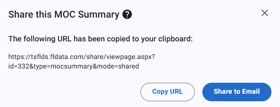
- Select Share
- From the MOC Details page:
- Select Send Emails
- Select Send Emails

Selecting Recipients
Users can select email recipients based on MOC roles or workflow task assignments.
MOC Roles
The following roles are available for selection:
- Originator – Displays the assigned Originator (Individual or Job)
- Implementation Manager – Displays the assigned Implementation Manager (Individual or Job)
If a Job is selected, the job name can be selected to view users assigned to that job.